Quick answer
Choose Advanced for a streamlined academic revision; choose Classic when you need controls.
Advanced removes settings and starts a one-click revision of a permitted academic draft up to 500 words. Classic preserves the familiar Natural, Academic, and Simple modes with selectable strengths for up to 1,000 words. The better result is the one you can verify for meaning, evidence, voice, and policy compliance.
Model comparison
Advanced and Classic Humanizer at a glance
The two workflows serve different revision decisions. They share the same purpose: helping you revise a draft that you are permitted to process. They do not replace source checking, originality work, institutional policy, or your final judgement.
| Compare | Advanced | Classic |
|---|---|---|
| Primary workflow | One-click revision for permitted academic drafts | Configurable revision for permitted general or academic writing |
| Controls | No mode or strength settings | Natural, Academic, and Simple modes with selectable strength |
| Per-request maximum | 500 words | 1,000 words |
| Free access | Paid-plan feature | 500 words per calendar month |
| Paid access | Shared monthly Humanizer allowance | Uses the same shared monthly Humanizer allowance |
| Best fit | A focused academic passage where you want a streamlined starting point | A draft where you want to choose the revision direction and intensity |
| Required final step | Review claims, citations, terminology, and policy fit | Review claims, citations, terminology, and policy fit |
Same-passage result comparison
See the visible outputs, not just the controls
Each card below uses the same neutral campus-library demonstration passage. Advanced and Classic are recorded FreeAcademicTools outputs. The StealthWriter and Grammarly examples are the user-provided result screenshots from that same passage, cropped only to remove unrelated browser framing and navigation. All evidence was captured on 27 August 2026.
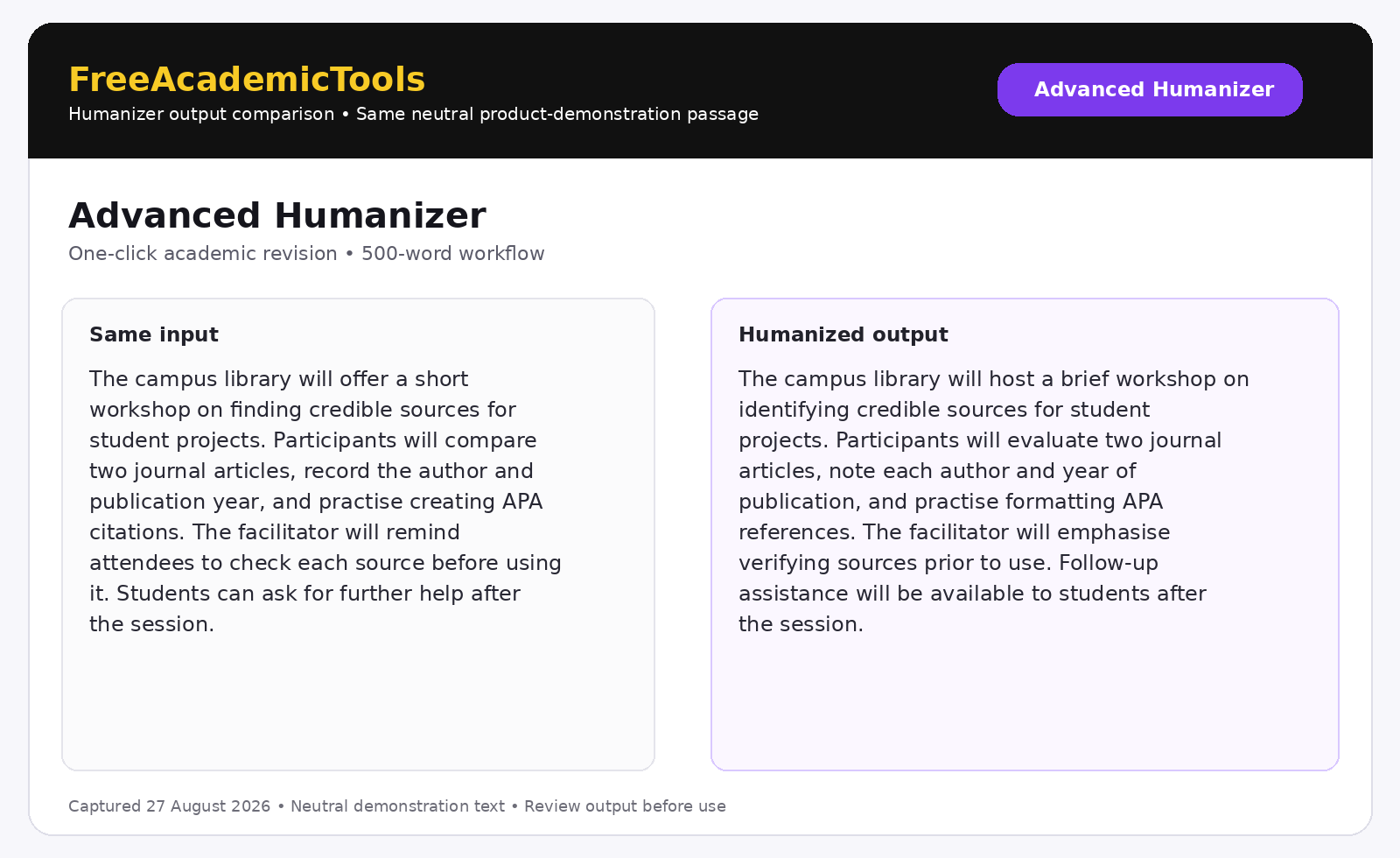
FreeAcademicTools — Advanced
Result shownActual one-click Advanced result, captured from the same neutral demonstration passage.
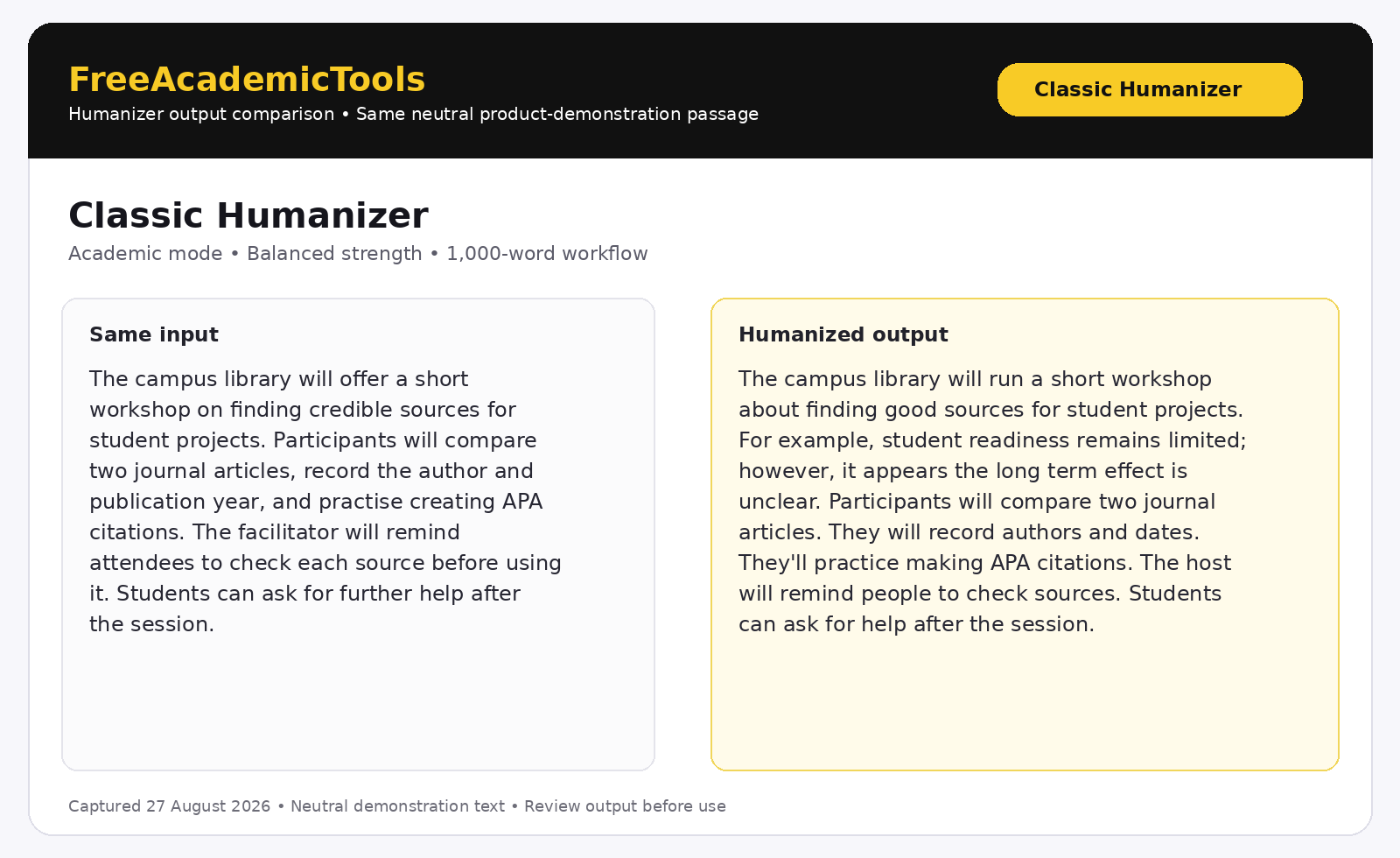
FreeAcademicTools — Classic
Result shownActual Classic result from the same passage using Academic mode and Balanced strength.
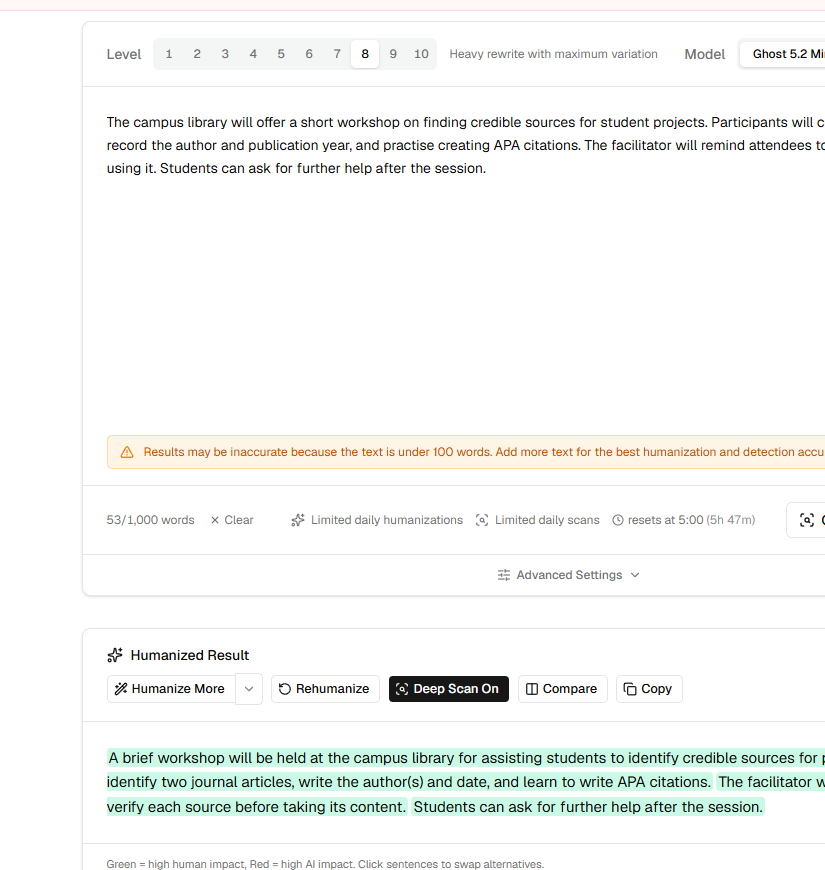
StealthWriter
Result shownUser-provided same-passage result screenshot, cropped to retain the input and visible output only.
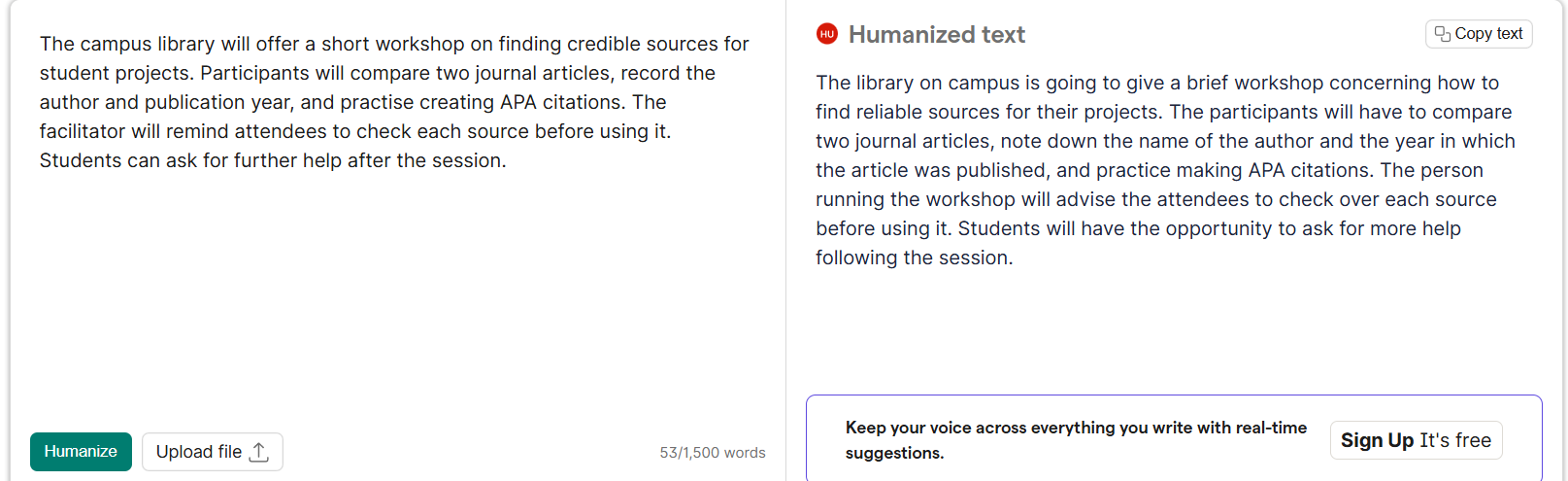
Grammarly AI Humanizer
Result shownUser-provided same-passage result screenshot, cropped to retain the input and visible output only.
What the two Humanizer results are designed to do
Advanced is designed to produce a natural, appropriately academic revision with no settings to configure. Classic makes its steering controls visible, so you can choose a broad writing direction and rewrite strength before generating. Both outputs are drafts for review, not finished work that can be submitted without checking.
Advanced result
Use this when you want one streamlined pass on a short permitted academic section. Its fixed workflow prioritises clear, natural academic phrasing while preserving material that requires careful review.
Classic result
Use this when the visible mode and strength controls matter to your editing decision. It remains useful for general, academic, and simpler writing contexts.
Release validation: the Advanced workflow was checked on 25 short, permission-safe passages across business, management, marketing, social sciences, healthcare, finance, and technical writing. The internal checks tested protected citations, quotations, values, dates, selected names and technical identifiers, output length, and private-reference leakage. This is a product-quality check—not a claim about any third-party detector.
Will Advanced Humanizer pass a Turnitin AI score?
No tool can promise that result. FreeAcademicTools does not access, reproduce, or predict official Turnitin reports. Turnitin says its AI-writing model may misidentify human-written, AI-generated, and AI-paraphrased text, and it says its AI report should not be used as the sole basis for an adverse academic decision. It also distinguishes AI-writing indicators from similarity scores. Read Turnitin’s guidance.
Use policy matters: student guidance from the University of Melbourne notes that allowed AI use varies by assessment and course, and that students are responsible for checking the applicable rules and acknowledgement requirements. Use an editor only when it is permitted, keep your own drafts and notes, and be prepared to explain your sources and reasoning. Read the student guidance.
How to choose the right Humanizer for your draft
Choose Advanced when
you have a permitted academic paragraph or short passage and want a clear, one-click revision without selecting settings.
Choose Classic when
you want to choose a Natural, Academic, or Simple direction and set the degree of rewriting for a permitted draft.
Choose neither when
your assignment prohibits AI assistance, the content is confidential or restricted, or you cannot independently check the facts and wording.
A four-step workflow that keeps you in control
- 1
Meaning and evidence
Compare the revision with your original draft. Restore qualifications or discipline-specific wording if it has shifted.
- 2
Citations and quotations
Check author-date citations, quotations, data, references, and URLs. Use the Citation Checker when a reference list is involved.
- 3
Your own voice
Make final changes until you could explain the reasoning and wording yourself.
- 4
Assessment rules
Confirm that AI-assisted revision is allowed for this assignment and follow any acknowledgement requirement.
Use Advanced Humanizer on a permitted draft
Advanced is included with every paid plan and accepts up to 500 words. Choose free Classic when you need mode and strength controls.
Advanced Humanizer access and monthly allowances
Free accounts receive 500 Classic Humanizer words per calendar month. Advanced Humanizer is included with every paid plan and accepts up to 500 words per request. Paid accounts receive a shared monthly Humanizer word allowance across both workflows: Student 10,000 words, Researcher 50,000 words, and Academic 100,000 words. See the Pricing page for current plan and semester-billing details.
Academic writing choices
AI Humanizer vs Paraphraser for academic writing
An AI humanizer and a paraphrasing tool can both change wording, but they solve different editing decisions. A humanizer revises the rhythm, clarity, and tone of a permitted draft. Paraphrasing is a source-use skill: you explain a source in your own words while preserving its meaning and citing it. Neither process removes the need to check evidence, references, or your course rules.
For academic work, choose the smallest tool that fits the task. That keeps your revision process clearer and makes final checking more manageable. The table below is a practical decision guide, not a substitute for institutional policy.
| Your task | Best starting point | What to verify |
|---|---|---|
| You need a short, one-click revision of a permitted academic passage | Advanced Humanizer | It uses a fixed academic-revision workflow. Compare the result with your original before using it. |
| You want to select the rewrite direction or degree of editing | Classic Humanizer | Its Natural, Academic, and Simple modes plus rewrite strengths make the editing choice visible. |
| You need to restate a source in your own explanation | Paraphrasing Tool | Write from your understanding, preserve the source meaning, and cite the original author rather than treating wording changes as a substitute for attribution. |
| You need to check citations or a reference list | Citation Checker | Check in-text citations and references separately after any permitted revision. |
Paraphrase a cited source responsibly
Use the Paraphrasing Tool after you understand the source and before you check that the citation remains accurate.
Finish with a mechanics check
Use the Grammar Checker after your substantive review to check punctuation and readability without treating it as a source check.
Does an AI Humanizer preserve citations?
A citation-preserving workflow should keep exact citations, quotations, numerical values, dates, named methods, and discipline-specific terminology visible for review. FreeAcademicTools Advanced Humanizer is designed with preservation checks for those categories, but you remain responsible for the final verification. No automated rewrite can determine whether a cited source truly supports a claim or whether a quotation is used fairly in context.
This distinction matters in literature reviews and research papers, where a small wording change can change the scope of a finding. After any permitted AI-assisted revision, compare the revised paragraph with your source notes, run the Citation Checker, and use the Academic Source Finder to confirm source metadata such as author, year, title, DOI, and venue before finalising a reference.
Practical rule: treat a Humanizer result as an editing draft. Treat citations, quotations, data, and references as evidence that must be checked against the original source.
How to humanize an AI-assisted literature review without changing the evidence
A literature review should do more than list studies. It needs a reasoned account of what the evidence shows, where studies agree or differ, and what remains uncertain. If your assessment permits AI-assisted editing, use a Humanizer only after you have found the sources, read them, drafted the synthesis, and recorded the citations yourself. Do not use a rewrite as a substitute for reading research or forming your own argument.
- 1
Compare the claim
Read each sentence beside the source draft. Restore a qualifier such as ‘may’, ‘suggests’, or ‘within this sample’ if the revision has made the claim stronger.
- 2
Check evidence markers
Verify every author-date citation, quotation, page number, statistic, date, acronym, table reference, and technical term before copying a revision into your document.
- 3
Review source use
Use the Citation Checker for matching and reference-list issues. Use the Citation Generator only to format the details you have verified, not to invent a source.
- 4
Restore your reasoning
Add your own synthesis, interpretation, and disciplinary judgement. A rewritten sentence is not a replacement for your research process.
- 5
Confirm the policy
Re-read the exact assessment instructions, keep your draft history, and disclose AI assistance when your institution or instructor requires it.
Build an RRL plan
Use the RRL Generator to structure themes and synthesis before you edit prose.
Develop the literature review
Use the Literature Review Generator to clarify scope, themes, and research gaps.
Format verified references
Use the Citation Generator once the publication details have been confirmed.
Frequently asked questions
What is the difference between Advanced and Classic Humanizer?
Advanced Humanizer is a one-click workflow for permitted academic draft revision. Classic Humanizer keeps selectable Natural, Academic, and Simple modes plus rewrite-strength controls for users who want to steer a revision more closely.
Does Advanced Humanizer guarantee a Turnitin AI score or detector result?
No. FreeAcademicTools does not measure, reproduce, or guarantee results from Turnitin or any other third-party detector. Turnitin says its AI-writing model may misidentify text and should not be the sole basis for an adverse academic decision. Review your work, course rules, sources, and writing process instead.
How much can I revise with Advanced Humanizer?
Advanced Humanizer is included with every paid plan and accepts up to 500 words per request. Student, Researcher, and Academic subscriptions include shared monthly Humanizer words across Advanced and Classic.
Can I still use the original Humanizer controls?
Yes. Classic Humanizer remains available with the same mode and strength choices for up to 1,000 words per request.
Is AI-assisted editing allowed for my assignment?
It depends on the exact assessment and institutional policy. Check the assignment brief before processing coursework through any AI editor. Where use is permitted, verify the final wording and acknowledge assistance if required.
What is the difference between an AI humanizer and a paraphraser for academic writing?
An AI humanizer revises clarity, rhythm, and tone in a permitted draft. Paraphrasing is the process of explaining a source in your own words while preserving its meaning and citing the source. Neither process replaces evidence checking, attribution, or course policy.
Does an AI humanizer preserve citations?
Advanced Humanizer is designed with preservation checks for citations, quotations, values, dates, names, and technical terms. You must still compare the output with the original text and sources, because a rewrite cannot establish whether a source supports a claim.
Can I use a humanizer for a literature review?
Only where your assessment rules allow AI-assisted editing. First find, read, and cite the research yourself; then use any rewrite as a draft to review for evidence, synthesis, citation accuracy, and your own academic voice.
References
- Turnitin. Using the AI Writing Report. Explains report scope, limitations, and the separation of AI-writing indicators from similarity scores.
- University of Melbourne. Advice for students regarding Turnitin and AI writing detection. Covers student responsibility, policy variation, and appropriate AI acknowledgement.
- University of Texas at Austin. AI Detection Software Guidance. Discusses academic integrity, privacy, and intellectual-property considerations around AI-detection software.
Written by
FreeAcademicTools.com Editorial Team
Our editorial team consists of PhD- and MPhil-qualified academic researchers and research methodology specialists with combined experience across business, social sciences, health sciences, and education. Every article is grounded in peer-reviewed literature and tested against real student use cases.
Written and reviewed by
Zunair Syed, PhD in Management Sciences
Last reviewed: 27 August 2026
Our Editorial Standards
FreeAcademicTools.com follows strict editorial guidelines. All factual claims are supported by peer-reviewed academic sources, cited inline. We do not accept sponsored content that influences editorial positions. Tool comparisons are based on hands-on testing by our research team. If you spot an error or outdated information, please contact our editorial team.