AI Humanizer Strength Settings Explained (Levels 1 to 5)
The strength slider is the most powerful — and most misunderstood — setting in any AI humanizer. Set it too low and repetitive phrasing may remain. Set it too high without reviewing the output and your argument may be distorted. This guide explains exactly what each strength level does in the FreeAcademicTools AI Humanizer and how to choose a setting for your writing and review needs.
Table of Contents
- Why Strength Matters for Writing Quality
- Strength 1 (Minimal): What It Does
- Strength 2 (Light): What It Does
- Strength 3 (Balanced): What It Does
- Strength 4 (Strong): What It Does
- Strength 5 (Maximum): What It Does
- Strength Comparison Table
- Reviewing a Maximum-Strength Rewrite
- Which Strength to Use for Your Situation
- Frequently Asked Questions
Why Strength Matters for Writing Quality
AI detectors like Turnitin and GPTZero assess patterns in text. Perplexity describes how predictable each word choice is, while burstiness describes variation across sentences. These concepts can help explain repetitive wording, but choosing a strength level should be about clarity, tone, and preserving your meaning rather than changing a detector's result.
The strength slider controls how much of the text the humanizer rewrites. At Strength 1, only the most obvious AI patterns are changed — typically 10–15% of sentences. At Strength 5, every sentence is rewritten. More extensive rewriting means more wording and sentence structure to compare with your original draft.
The trade-off is quality control. Rewriting every sentence increases the risk that the tool will occasionally simplify a complex argument, change the emphasis of a sentence, or introduce a minor grammatical issue. This is why reviewing the output is essential at Strength 4–5 — check that the rewrite preserves your argument and citations.
Minimal: Light Touch, Preserves 90% of Structure
Strength 1 (Minimal) makes the smallest possible changes to your text. It targets only the most obvious AI patterns — typically replacing a handful of predictable word choices and splitting one or two very long sentences. The output is nearly identical to the input.
Sentences rewritten
~10–15%
Review focus
Word choices
Use for a light touch-up. Review the changed wording against your original meaning.
Light: Moderate Edits, Fixes Obvious AI Patterns
Strength 2 (Light) rewrites approximately 25–30% of sentences. It targets repetitive wording and sentence patterns — very long uniform sentences, predictable transition phrases ("Furthermore," "Moreover," "Additionally" used repeatedly), and overly formal vocabulary clusters.
Sentences rewritten
~25–30%
Review focus
Tone and transitions
Use for targeted edits. Check that revised transitions still connect your ideas and that the vocabulary suits your intended tone.
Balanced: Default — Rewrites ~50% of Sentences
Strength 3 (Balanced) is the default setting and a good starting point for most texts. It rewrites approximately half of all sentences, targeting repetitive phrasing while preserving the structure of the other half. Review the revised sentences for clarity and check that specific phrasing still expresses your argument accurately.
Sentences rewritten
~50%
Review focus
Phrasing and structure
Good for dissertations and thesis chapters where you need to preserve specific phrasing and argument structure. Use Strength 4–5 only when more substantial rewriting is needed, then review meaning and citations line by line.
Strong: Aggressive — Rewrites ~70% of Sentences
Strength 4 (Strong) rewrites approximately 70% of sentences. This level involves more substantial changes to wording and sentence structure than Balanced. Compare the output with the original to check that your argument, emphasis, and citations remain intact.
Sentences rewritten
~70%
Review focus
Argument and emphasis
Use for substantial sentence editing. Choose Strong when lighter edits leave awkward wording or uneven sentence structure. Review the output before submitting.
Maximum: Full Rewrite — Review Every Line
Strength 5 (Maximum) rewrites every sentence in the passage. This is the most aggressive setting and involves the most extensive changes to wording and sentence structure. Use it for heavier rewriting, then review every line for meaning and citations.
Sentences rewritten
~100%
Review focus
Meaning and citations
Use when a full rewrite is needed. Compare each rewritten sentence with your original argument. Always review the output carefully before submitting.
Important: At Maximum strength, always read through the entire output before submitting. Check that your thesis, evidence, citations, and argument flow are all intact.
Strength Comparison Table
| Strength | Sentences Rewritten | Review Focus | Best For | Review Needed? |
|---|---|---|---|---|
| 1 — Minimal | ~10–15% | Word choices | Quick touch-up only | Check changed wording |
| 2 — Light | ~25–30% | Tone and transitions | Targeted wording edits | Check revised sentences |
| 3 — Balanced | ~50% | Phrasing and structure | Dissertations, thesis chapters | Recommended |
| 4 — Strong | ~70% | Argument and emphasis | Essays needing substantial revision | Yes |
| 5 — Maximum | ~100% | Meaning and citations | Drafts needing a full rewrite | Essential |
Reviewing a Maximum-Strength Rewrite
When using the FreeAcademicTools.com AI Humanizer in Academic mode at Strength 5 (Maximum), compare the original paragraph with the rewritten output. Focus on whether the formal tone, evidence, and meaning are preserved rather than treating a detector score as the goal.
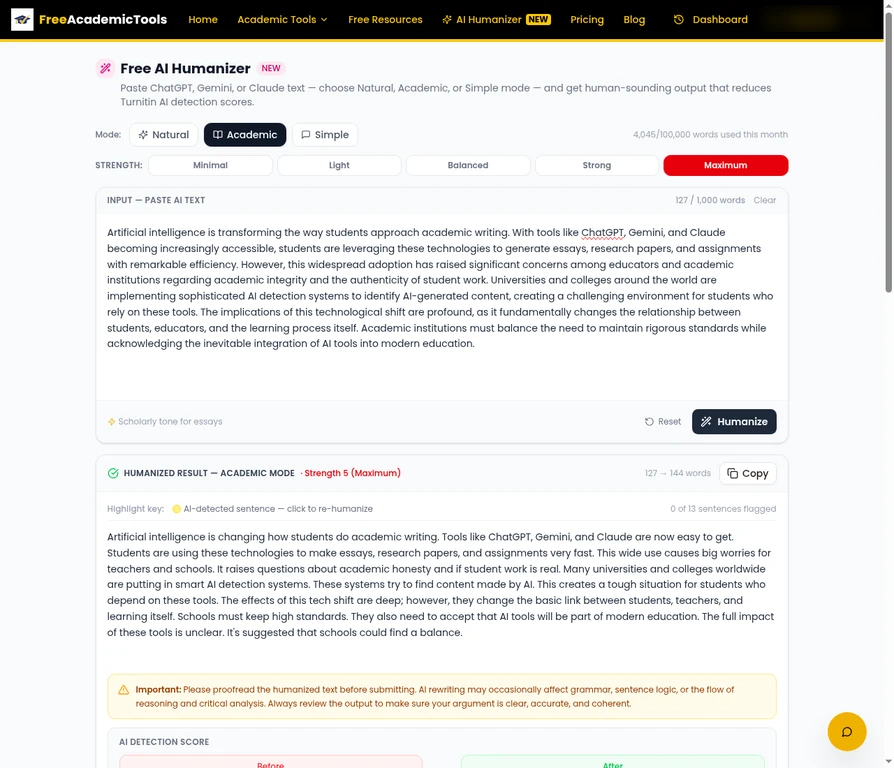
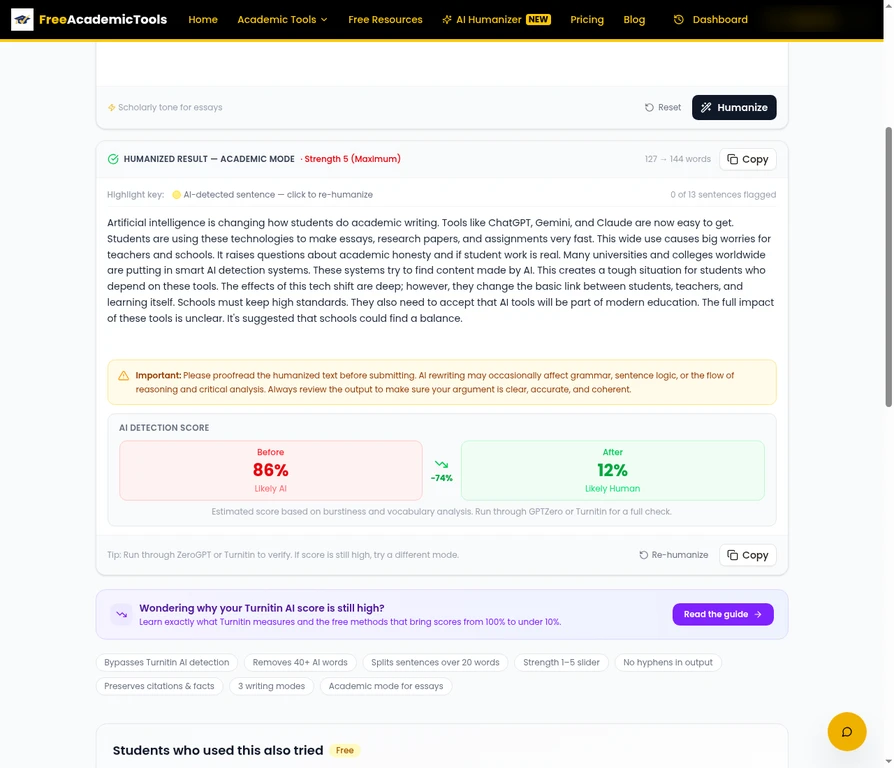
Review the Academic-mode output for formal vocabulary and argument structure. Check that changes to individual sentences preserve the relationship between your claims, evidence, and citations.
Compare Balanced, Strong, and Maximum by the wording they change and the review each rewrite needs. Choose the least extensive rewrite that addresses the writing problems you identified, and check every changed sentence against the original meaning.
Which Strength to Use for Your Situation
University essay needing a full rewrite
5 — MaximumUse Maximum for heavier rewriting when the essay needs changes throughout. Review every line to check that your thesis, evidence, and citations remain intact.
Research paper or dissertation chapter
3–4 — Balanced/StrongUse Balanced or Strong to preserve more of the original argument structure. Move from Strength 3 to Strength 4 only if awkward wording remains, then check the revised argument and citations.
Draft needing varied sentence structure
4–5 — Strong/MaximumUse Strong or Maximum for more substantial sentence restructuring. Check that changes in sentence length and emphasis preserve your meaning and intended tone.
Blog post or article
3 — BalancedBalanced strength is usually sufficient for web content. Higher strength may over-rewrite and produce output that needs more editing.
Text that already reads clearly
2–3 — Light/BalancedUse Light or Balanced for targeted phrasing changes rather than rewriting a clear draft unnecessarily. Review changed sentences for tone and meaning.
Text with complex technical arguments
3 — Balanced (then review individual sentences)Start with Balanced to preserve your technical reasoning. Use the sentence-level re-humanize feature where wording needs clarification, then check technical terms, meaning, and citations.
Test Every Strength Level Free
Try all 5 strength levels on your text. No sign-up. No word limit. Real AI detection score before and after each run.
Try AI Humanizer FreeFrequently Asked Questions
Which AI humanizer strength setting makes the most extensive changes?
Strength 5 (Maximum) makes the most extensive changes. It rewrites every sentence in the passage, changing structure, vocabulary, and sentence length throughout. Use it for heavier rewriting, then review every line for meaning and citations. Aggressive rewriting may simplify complex arguments.
What is the difference between Strength 3 and Strength 5?
Strength 3 (Balanced) rewrites approximately 50% of sentences, preserving the structure and phrasing of the other half. Strength 5 (Maximum) rewrites every sentence. Use Strength 3 when you need to preserve specific phrasing; use Strength 5 for heavier rewriting, then review every line for meaning and citations.
Does higher strength mean worse quality?
Not necessarily. At Strength 4–5, the humanizer produces high-quality rewrites for most texts. The main risk is that very complex arguments may be simplified at Maximum strength. Always review the output before submitting — particularly check that your thesis, evidence, and citations are intact.
Can I re-humanize individual sentences?
Yes. The humanizer highlights any sentence that still shows AI-detection signals after the initial rewrite. Click any highlighted sentence to re-humanize just that sentence with a different rewrite. This is useful for technical sentences that are hard to rephrase without losing precision.
Related Articles
How to Use a Free AI Humanizer to Pass Turnitin and GPTZero in 2026
Step-by-step guide to using a free AI humanizer in 2026. Real before/after test: 86% AI score dropped to 12% using Academic mode at Maximum strength.
Best AI Humanizer for Students (2026): How to Choose Responsibly
A transparent guide to evaluating AI humanizers for permitted revisions, with criteria for meaning retention, tone control, privacy, policy fit, and final review.
How to Reduce Your Turnitin AI Score in 2026 (Free Methods That Work)
Complete guide to reducing your Turnitin AI detection score in 2026. Learn what Turnitin's AI report measures, why false positives happen, and the exact free methods that bring AI scores from 100% down to under 10%.